
Ag HHS Vet Employment Quick Hire Recruitment
The Ag, HHS, and Vet Employment Center manages requisitions and job postings for all quick hires. Quick hires include all positions that are not faculty or staff.
To support you through the position posting and recruitment process, we’ve outlined key steps such as submitting position requests, reviewing applicants, and coordinating next steps. Please review the sections below to help ensure the process moves smoothly from posting through selection.
Funding approval is required for all positions. Please work with your departmental business office to ensure all required approvals are in place before submitting a posting request.
Once all approvals are in place, complete the posting request form with the required position details. The Employment Center will then:
- Create the position (if needed)
- Create the requisition
- Post the position to the Careers site
Access the Requisition
-
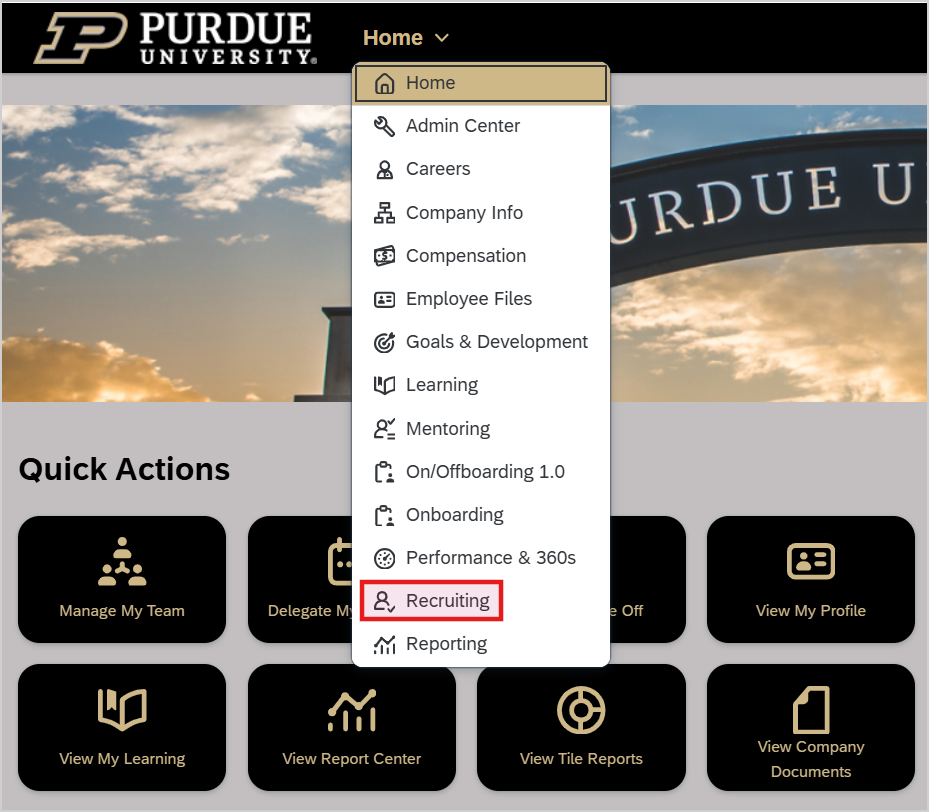
Log in to SuccessFactors through OneCampus → Employee Launchpad

-
Navigate to Recruiting → Job Requisitions
-
Locate the requisition created by the Employment Center
-
Under the Candidates column, click the number of candidates to open the candidate list
Manage Candidates
Candidates are accessed through the Job Requisition listing. The Talent Pipeline, displayed across the top of the page, is the primary tool for managing candidates throughout the hiring process.
Because this is a quick hire process, use only the pipeline stages that make the most sense for your recruitment needs. It is not required to use all stages. All candidates will initially appear in the New Application stage.
Review Candidates
- Click the candidate’s name to view their profile
-
Review the application, resume, and any attached documents
Update Candidate Status
Candidates may be moved along the Talent Pipeline using either method below.
Method A – Take Action Menu
-
Open the candidate’s profile
-
Select Take Action → Move Candidate
-
Choose the appropriate status from the drop-down menu
-
Enter comments, if necessary
-
Click Apply Updates
Method B – Drag and Drop
-
Select the icon next to the candidate’s name
-
Drag the candidate across the Talent Pipeline
-
Drop the candidate into the appropriate stage to update their status
Once the candidate(s) have been identified, a verbal offer may be made. When extending the offer, please remember:
-
A minimum two-week timeframe between submitting the hire request and the start date is required to allow sufficient time to complete all onboarding tasks.
-
Federal law requires new hires to complete Form I-9 within 3 business days of their hire date. Discuss the candidate’s ability to obtain and present the required documentation by the due date.
-
Original, unexpired documentation must be provided to an I-9 Verifier. Photocopies, screenshots, or documentation accessible only via a phone or iPad cannot be accepted. Clarify any questions about acceptable documentation before the hire date to avoid delays.
-
Any training or orientation related to the position must be paid time.
- If the hire date is different from their first day on the job, remind the new hire of their actual hire date. Form I-9 completion is still required within three business days of the hire date, even if the employee has not yet started work.
New Employee Onboarding – Supervisors New Employee Onboarding – Employees
Review these sites to access helpful information and resources for successful onboarding.
After the verbal offer is accepted and the start date is confirmed, submit a hire request ticket to the Employment Center. Include the following information in the additional comments:
-
Job requisition number
Once the request is received, the Employment Center will handle the following:
-
Offer letters (if applicable)
-
Background checks
-
Onboarding