REEport Directions for Progress Reports -Grants
RETURNING USERS: Log in to NIFA’s reporting portal at portal.nifa.usda.gov using your Purdue email address and the password you created when you activated your account.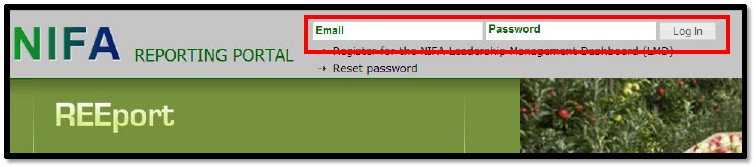
FORGOTTEN PASSWORD (or first time users): If you have forgotten your password or if this is your first time using the NIFA Reporting Portal, go to the website at portal.nifa.usda.gov, click on Reset Password, then follow the instructions on the next screen.
Please Note: If the system tells you that your email address is not recognized, please contact Julie Estrada at 494-6047 or estradaja@purdue.edu to troubleshoot the issue.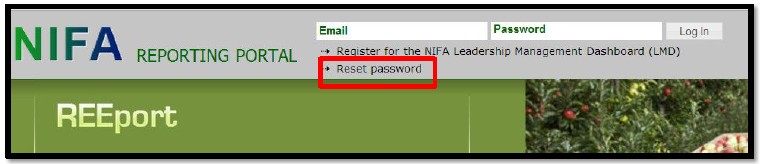
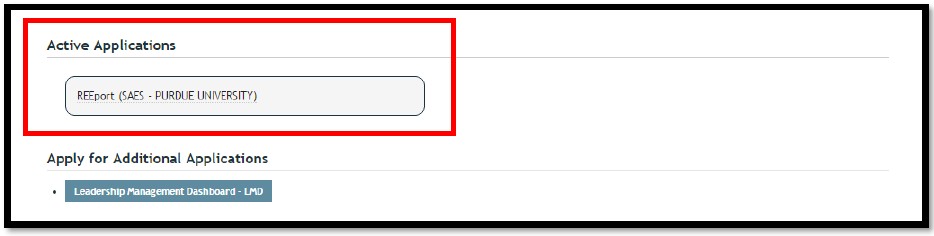
After you’ve logged on, click on REEport (SAES – PURDUE UNIVERSITY) under Active Applications near the bottom of the page.
Please Note: If you do not have REEport (SAES – PURDUE UNIVERSITY) under active applications or you only have REEport (PURDUE UNIVERSITY) without the SAES, please contact Julie Estrada at 494-6047 or estradaja@purdue.edu. You must use the SAES (State Agricultural Experiment Station) portal.
Chrome and Safari Users: You may get the following warning if you are using a browser other than Internet Explorer or Firefox, but REEport will still work with other browsers such as Chrome or Safari. Just click OK to continue.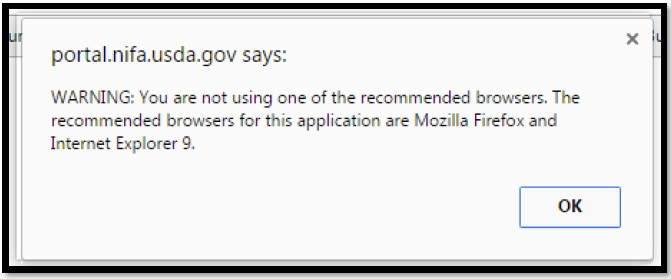
Click on the Progress Report icon or Progress Report at the top menu bar.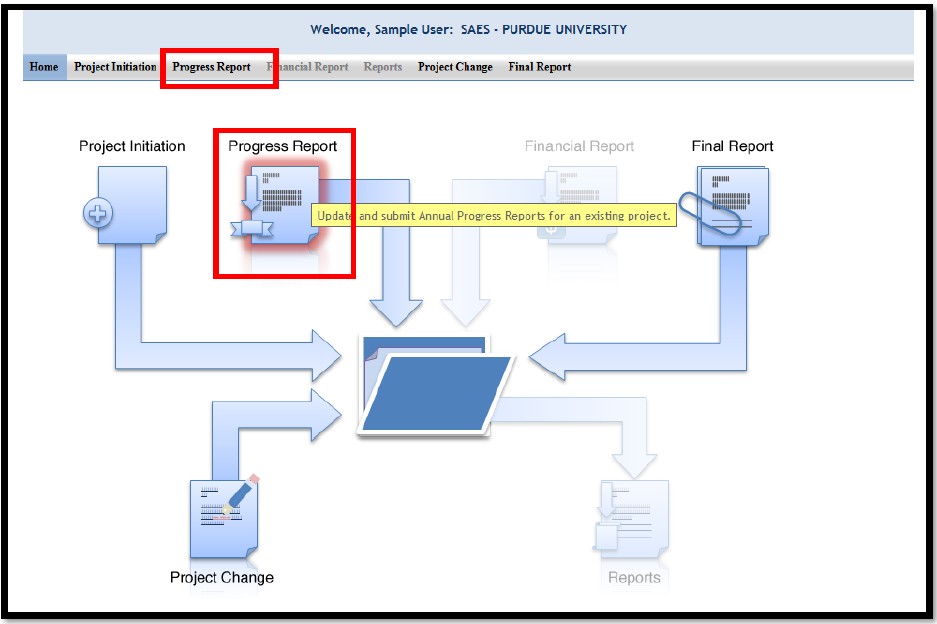
The Track Progress Reports page will open.
Do not enter anything in the search fields!
Instead, look in the Progress Reports in Draft folder (by clicking on the folder icon) to find your project.
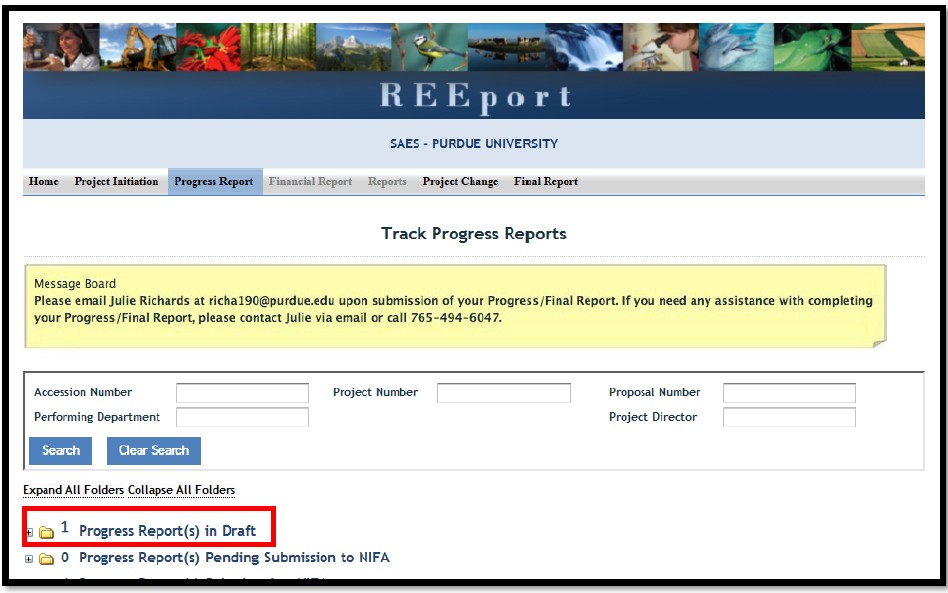
To begin completing the progress report, open the report by clicking on the title of the project (or any other underlined text except “PDF”).
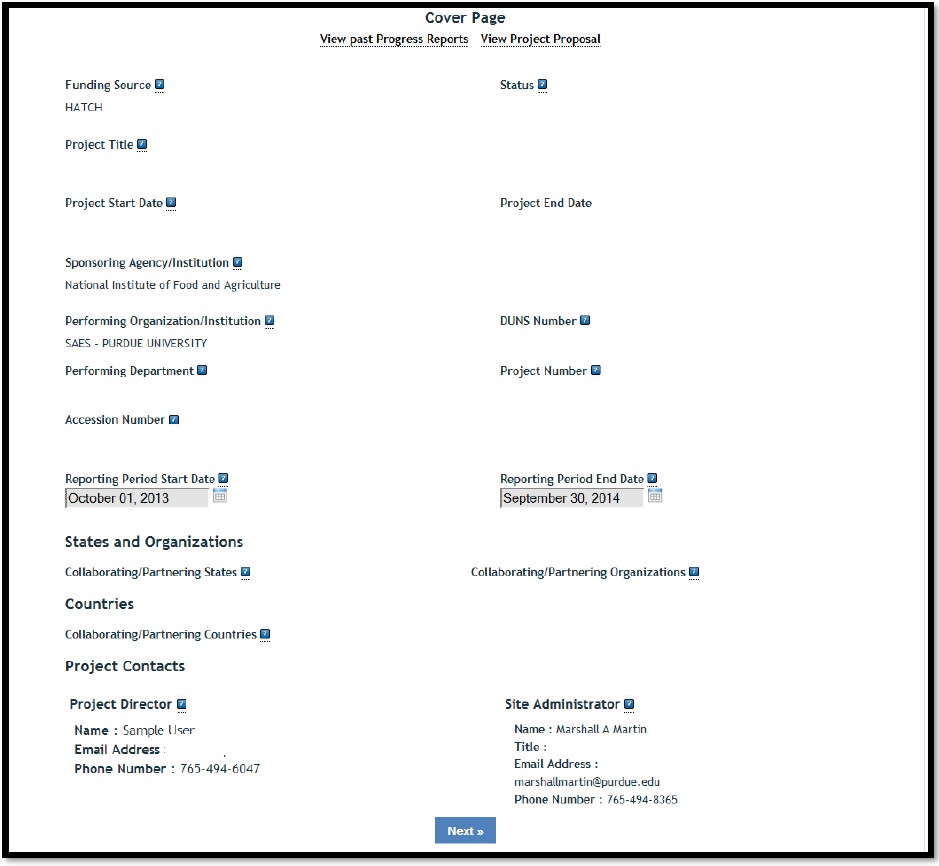
Cover Page
The Cover Page displays identifying information for your project, which is prepopulated from Grants.gov and the approved project initiation in REEport.
These fields are non-editable for NIFA Competitive awards. If any of these fields are incorrect, email the REEport Help Desk at Electronic@usda.gov. In this email communication, please include the award or accession number, field name(s), and correct data.
It would be a good idea to make a mental note of the reporting period start and end dates on your cover page. The reporting period will be referred to several times within the report.
Click Next.
Helpful Hint: You can view all Past Progress Reports for this project (if applicable) by clicking the option at the top. You may find it helpful to have those open in another tab or window when completing your current report.
Participants
These fields are pre-populated from Grants.gov and the approved project initiation in REEport. These fields are non-editable for NIFA Competitive awards. If any of these fields are incorrect, email the REEport Help Desk at Electronic@usda.gov. In this email communication, please include the proposal or accession number, field name(s), and correct data.
Project Director: Your name and contact information should be listed here.
Co-Project Directors: If your Co-PDs have changed, make a note of it in the Changes/Problems tab at the end of the report.
Actual FTEs for this Reporting Period: If you have a 20% research appointment, and all of your research time is dedicated to the research in this proposal, you would put 0.2. Adjust the numbers accordingly if your research time is split between two or more projects. For Co-PDs, grad and undergrad assistants, etc., just calculate their time in the same way. To help you decide which row to put each in, click on the blue question mark in the REEport application.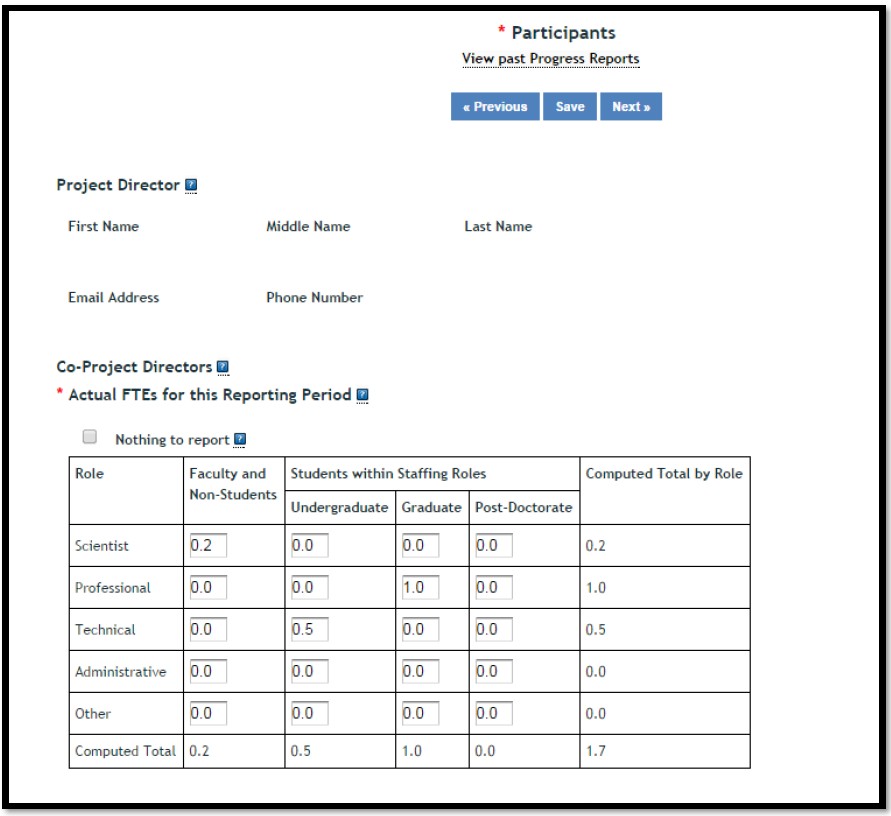
Participants (continued)
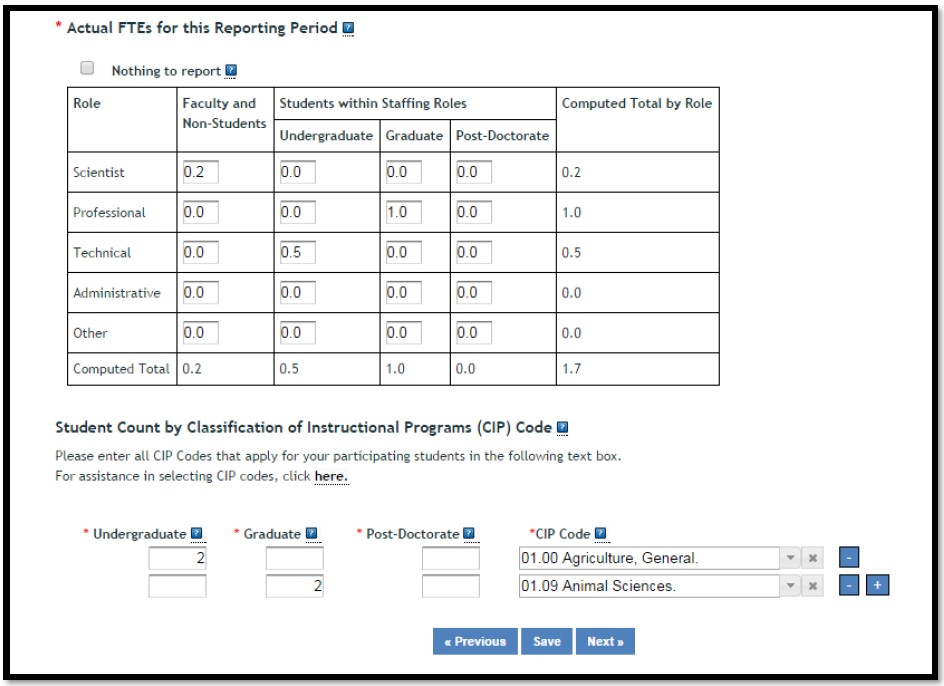
Student Count by Classification of Instructional Programs (CIP) Code:
If any Student FTEs are reported, then it is required to enter any applicable CIP codes, and vice versa. The data entered into the Undergraduate, Graduate, or Post-Doctorate CIP fields, are the Number of Students that worked on the project, and therefore must be whole numbers. The CIP code chosen should reflect the student’s major field of study. For a full list of CIP codes to pick from, click here.
Click Next.
Example:
In the example below, you will see that we listed 1.0 for graduate students and 0.5 for undergraduate students in the Actual FTEs for this Reporting Period table. Therefore, it was necessary to show two things in the CIP Code section:
- How many actual students do the FTE numbers represent
- What is the major field of study for each of the students
Target Audience
The target audience(s) you describe should include only those that your efforts reached during the current reporting period; this may mean that the audiences you list are only a subset of the all those you included on your project initiation.
Target audiences include individuals, groups, market segments, or communities that will be served by the project. The description should include why you are targeting these particular group(s). The purpose of this section is to answer the question “to whom does your work/research matter and why?”
Click Next.
HELPFUL HINTS:
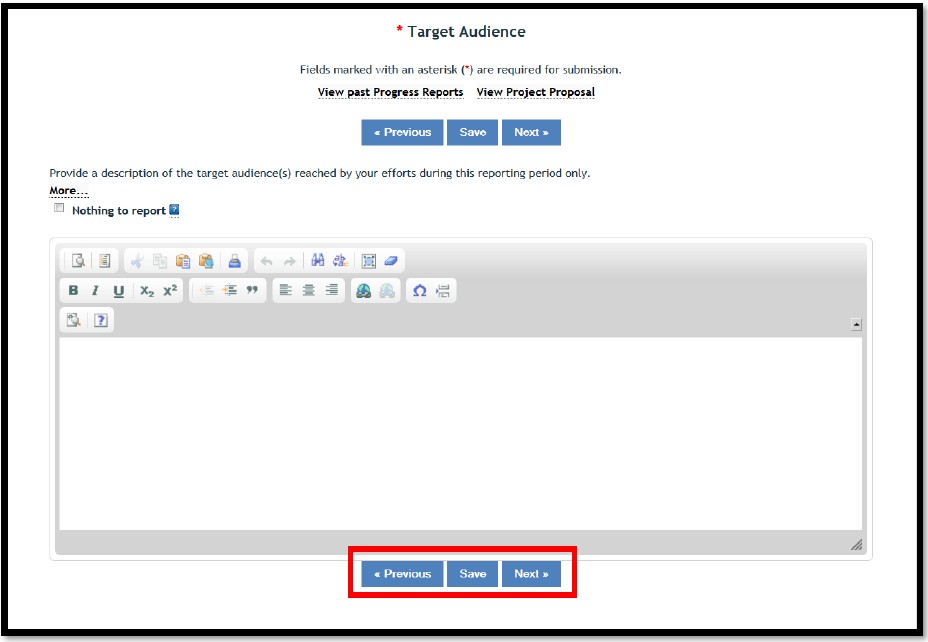
Clicking on Previous or Next automatically saves your progress as you move forward or backward in the system. Clicking Save, saves your work on that page, while keeping you on that page.
Products
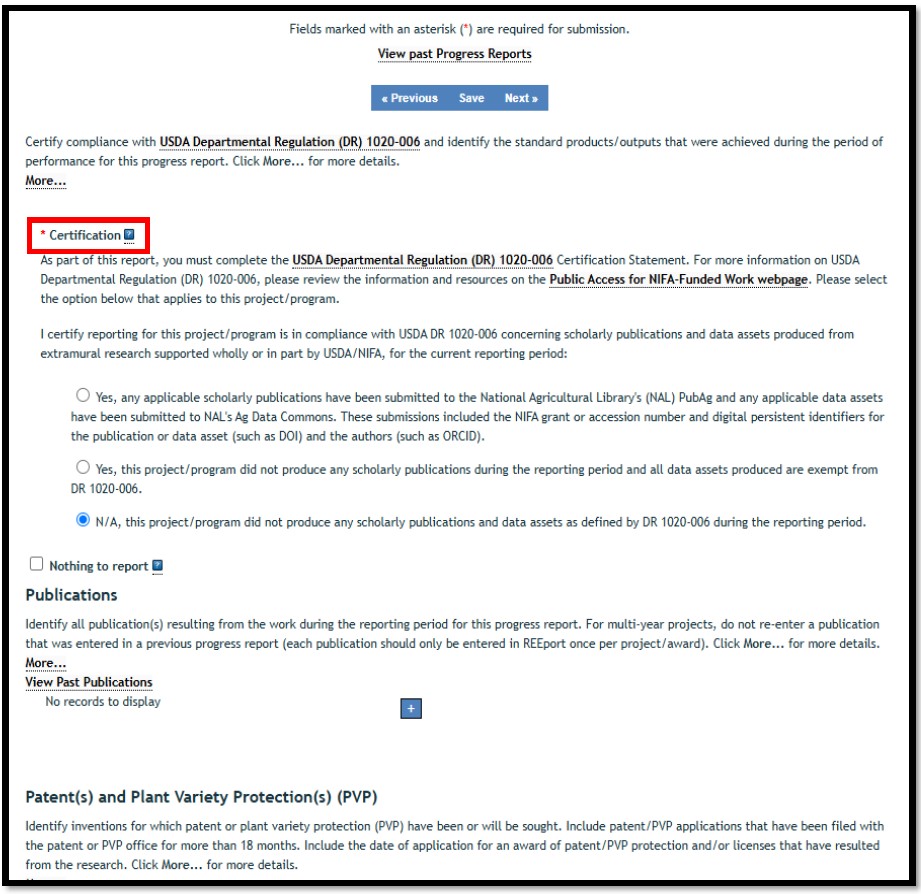
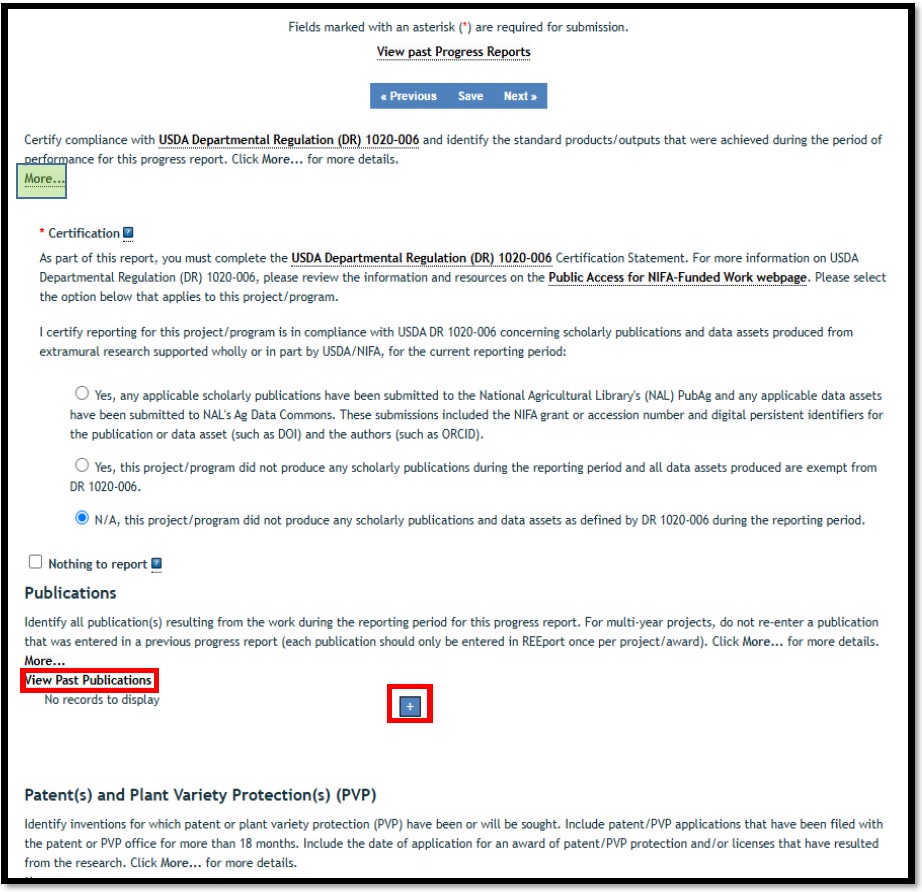
On the Products page, you are asked to certify compliance with USDA Departmental Regulation (DR) 1020-006 and identify the standard products/outputs that were achieved during the reporting period for the progress report.
This required field asks you to certify that your project is in compliance with USDA DR 1020006 concerning scholarly publications and data assets produced from extramural research supported wholly or in part by USDA/NIFA for the current reporting period.
- If the First YES response is selected, you MUST report at least one Peer Reviewed Journal Article on the Products page or one Data Asset on the Other Products page within this report.
- If the Second YES response is selected, you CANNOT report any Peer Reviewed Journal Articles on the Products page or Data Assets on the Other Products page within this report. If the Second YES is selected, you MAY report Other Journal Articles on the Products page or Data Assets -Exempt from Public Access Requirements on the Other Products page.
- If the N/A response is selected, you CANNOT report any Peer Reviewed Journal Articles on the Products page or Data Assets on the Other Products page within this report. If the N/A response is selected, you MAY report Other Journal Articles on the Products page or Data Assets -Exempt from Public Access Requirements on the Other Products page.
Products (continued)
Publications are the characteristic product of research. Agencies evaluate what the publications demonstrate about the excellence and significance of the research and the efficacy with which the results are being communicated to colleagues, potential users, and the public, not the number of publications.
Identify all publication(s) resulting from the work under this project/award for the reporting period. If there is a publication that occurred any time throughout the life of the project thus far but that you have NOT YET INCLUDED on a previous progress report, then you should include it here (click View Past Publications if you aren’t sure if you’ve reported a publication already). There is no restriction on the number. However, agencies are interested in only those publications that most reflect the work under this project/award.
List one product at a time. To add more products, click the blue “+” button.
Patent(s) and Plant Variety Protection(s) (PVP):
Identify inventions for which patents or plant variety protection (PVP) has been or will be sought. If you do not have any to list, leave this section blank.
Click Next
Helpful Hint: Click on the “more_” button for information about what is being asked of you in this section.
Other Products
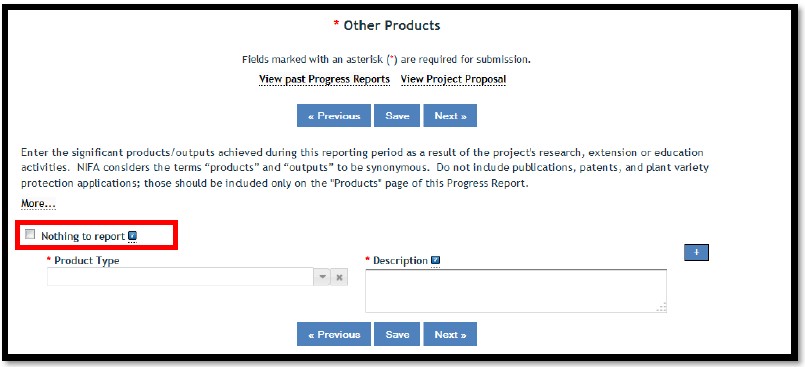
Enter the significant products and outputs achieved during the reporting period as a result of the project's research, extension, or education activities.
To report product(s) on this page, click the blue plus sign box to add an entry and complete all applicable field(s) for each product reported.
NIFA considers the terms “products” and “outputs” to be synonymous.
- Do not include publications, patents, and plant variety protection applications; those should be included only on the "Products" page of the Progress Report.
- Do not re-enter products or outputs if they were included in a previous year progress report for the same project/award.
You may review the previous progress report content by clicking on the “View past Progress Reports” link. If you do not have any other products to list, check the box next to Nothing to report.
Click Next.
Accomplishments
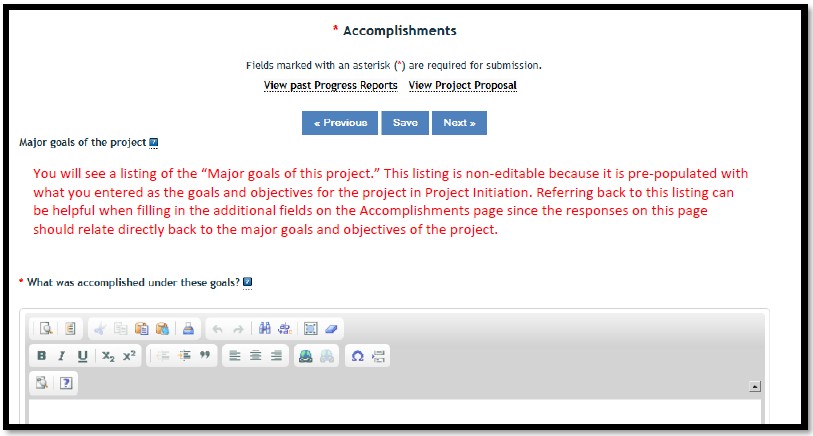
In this section, NIFA defines Accomplishments as outcomes and impacts achieved as a result of the project and the results of the activities/experiments that led to the outcomes and impacts. An outcome is defined as a measurable and documented change in knowledge, action, or condition that occurred as a result of the project.
Please use qualitative and quantitative metrics that will be meaningful to non-scientific audiences such as community leaders, politicians, taxpayers, and farmers. It is imperative that this portion of your report be written in plain, non-technical language.
What was accomplished under these goals?
- RELEVANCE: In a few sentences, what is the issue or problem that your project addresses (i.e., what are you trying to help solve, fix, mitigate, improve?)
- RESPONSE: For each goal and objective listed in your project initiation form (shown at the top of the screen), describe for this reporting period: a) Major activities completed / experiments conducted; b) Data collected; and c) Summary statistics and discussion of results / findings.
- OUTCOMES: Describe the key outcomes or other accomplishments realized. In a few sentences, what did your project do about this issue/problem during this reporting period? (HINT: Revisit your inputs, outputs, and outcomes to describe accomplishments)
- IMPACT: Who or what will be most immediately helped by your work, and how? (Hint: What audience did you originally intend for your work to impact?)
Accomplishments (continued):
What opportunities for training and professional development has the project provided? Describe opportunities for training and professional development provided to anyone who worked on the project or anyone who was involved in the activities supported by the project.
If the research is not intended to provide training and professional development opportunities, or there is nothing to significant to report during this reporting period, click the “Nothing to report” checkbox.
How have the results been disseminated to communities of interest? Describe how the results have been disseminated to communities of interest. Include any outreach activities that have been undertaken to reach members of communities who are not usually aware of these research activities for the purpose of enhancing public understanding and increasing interest in learning and careers in science, technology, and the humanities.
If no results were disseminated, or there is nothing to significant to report during this reporting period, click the “Nothing to report” checkbox. What do you plan to do during the next reporting period to accomplish the goals? Describe briefly what you plan to do during the next reporting period to accomplish the goals and objectives. Paragraphs and/or lists are acceptable. Highlight specific actions you will take that will address any issues or problems you encountered during this current reporting period. Include a discussion of stated goals not yet met.
Click Next.
Changes/Problems
Major changes include:
- major problems or delays that may have a significant impact on the rate of expenditure;
- changes to the approved Data Management Plan
- significant deviations from research schedule or goals;
- unexpected outcomes;
- or changes in approved protocols for the use or care of animals, human subjects, and/or biohazards encountered during the reporting period.
If you had none of the above, click the box for "Nothing to report."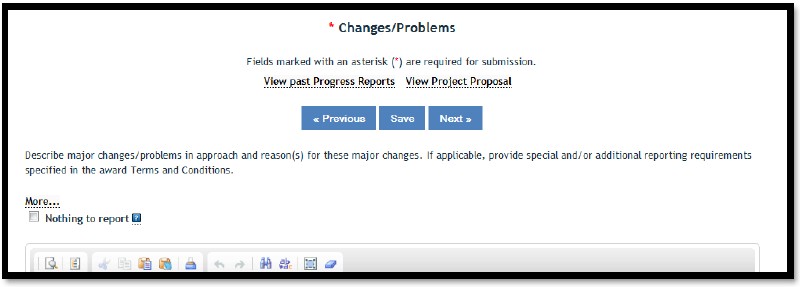
Submit for Review
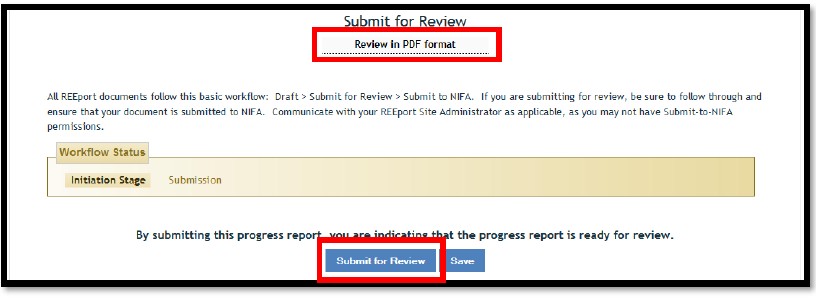
If you have completed all required sections, your screen should look like the picture below.
We recommend that you save a PDF copy for your records by clicking on Review in PDF Format and then saving a copy to your computer.
Click on Submit for Review.
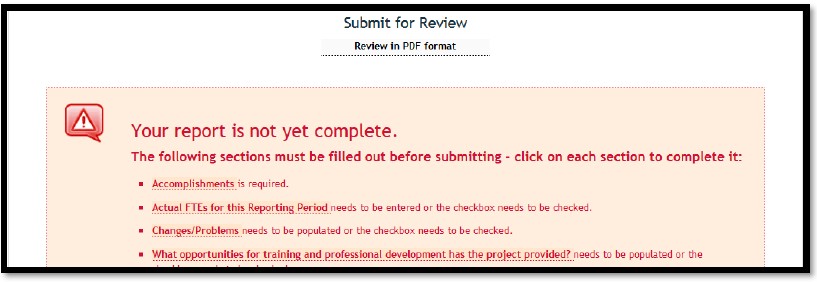
 Please Note: If your screen looks like the picture below, you must complete all of the sections that are listed before you’ll be able to submit your report for review.
Once you click Submit for Review, you will be redirected to the Track Progress Reports page.
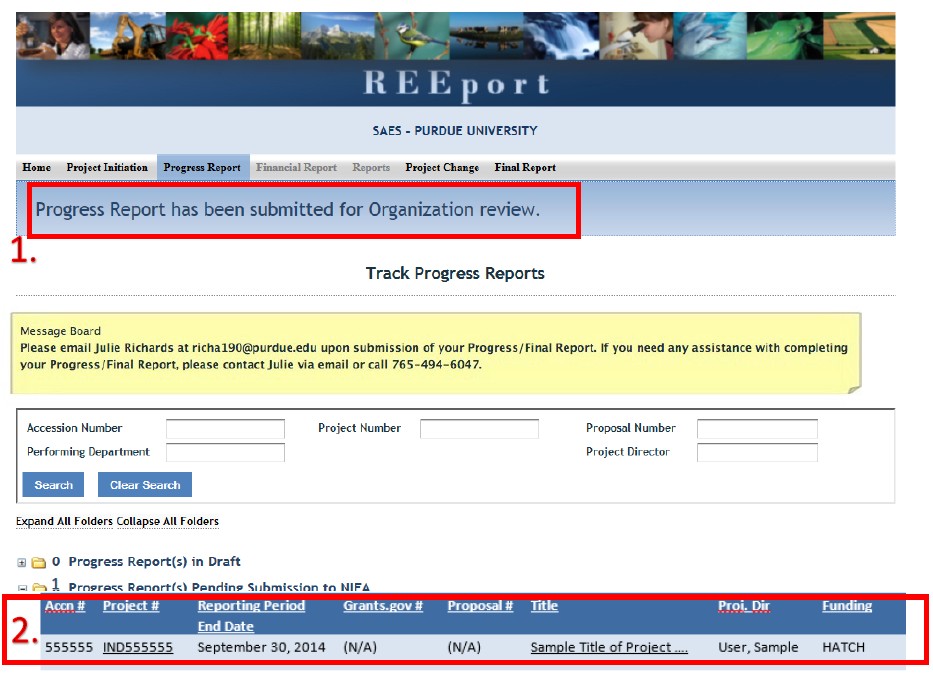
There will be two indications that your progress report has been properly submitted for organizational level review.
- The blue announcement text above Track Progress Reports should read, Progress Report has been submitted for Organization review.
- Your report should have moved from the Progress Report(s) in Draft folder to the Progress Report(s) Pending Submission to NIFA folder.
IMPORTANT: Email Julie Estrada at estradaja@purdue.edu to notify ARGE that you have submitted your report for review. Your report will be reviewed and submitted to USDA-NIFA.
Thank you!